November 27, 2026
How to remap the keyboard in macOS, key by key on a MacBook
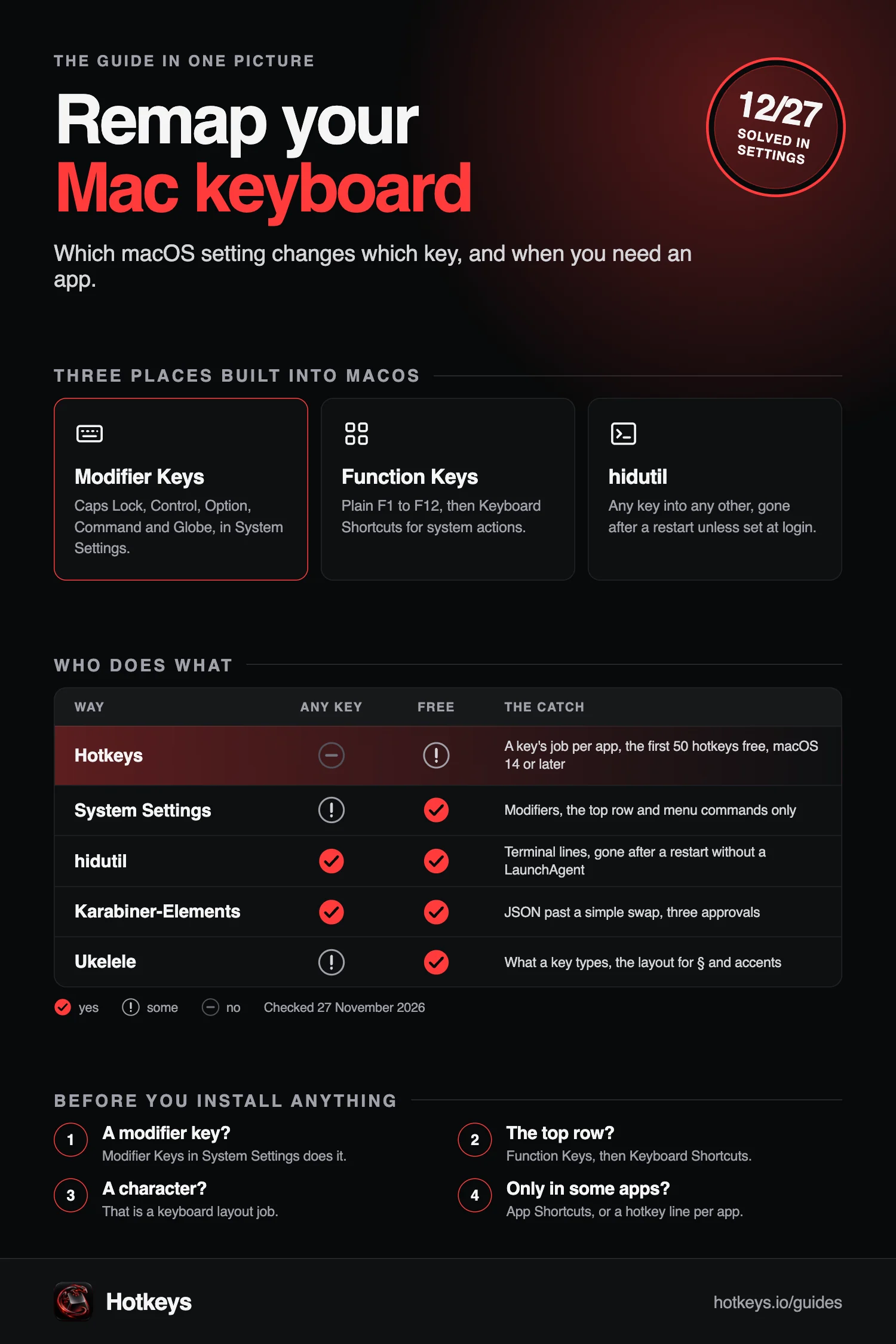
macOS remaps keys in three places of its own. Modifier Keys in System Settings turns Caps Lock, Control, Option, Command or the Globe key into another of them, or into nothing. Function Keys and Keyboard Shortcuts make the MacBook top row plain F1 to F12 and put any of them on a system action like Spotlight or Mission Control. The hidutil command in Terminal makes any key send any other key until the next restart. What a key types belongs to a keyboard layout, and a key with its own job in each app needs an app.
Below is a map of the MacBook keys against those places, and the 34 remap questions asked on r/MacOS since January 2024 sorted by the place that answers them: 12 had an answer in System Settings, 3 needed Karabiner-Elements. We make Hotkeys, the app for the per app part.
Which part of macOS remaps which MacBook key
A MacBook Air, MacBook Pro or MacBook Neo has 78 keys on the US (ANSI) keyboard and 79 on the ISO one, 12 of them function keys. Five keys of a desk keyboard are missing and live under fn. The top row below is the one of a MacBook Air and a MacBook Neo.
| Key | Out of the box | What changes it |
|---|---|---|
| Caps Lock, Control, Option, Command | Modifiers | Modifier Keys |
| Globe (fn) | Emoji and symbols | Modifier Keys, Press Globe key to |
| F1, F2 | Display brightness | Function Keys, then Keyboard Shortcuts |
| F3, F4 | Mission Control, Spotlight | The same |
| F5, F6 | Dictation or Siri, Do Not Disturb | The same |
| F7 to F12 | Media, mute, volume | The same |
| Home, End, Page keys, Forward Delete | Not on the keyboard | fn with an arrow or Delete |
| Letters, digits, punctuation, § | Type a character | A keyboard layout |
| One side of a modifier, a broken key | No setting | hidutil |
| A key with a job per app | No setting | App Shortcuts or an app |
34 questions on r/MacOS, and 3 needed Karabiner
We read every r/MacOS post with remap in the title from January 2024 to 27 November 2026, 34 after one repost, and sorted them by what the poster wanted, not by what they ended up using.
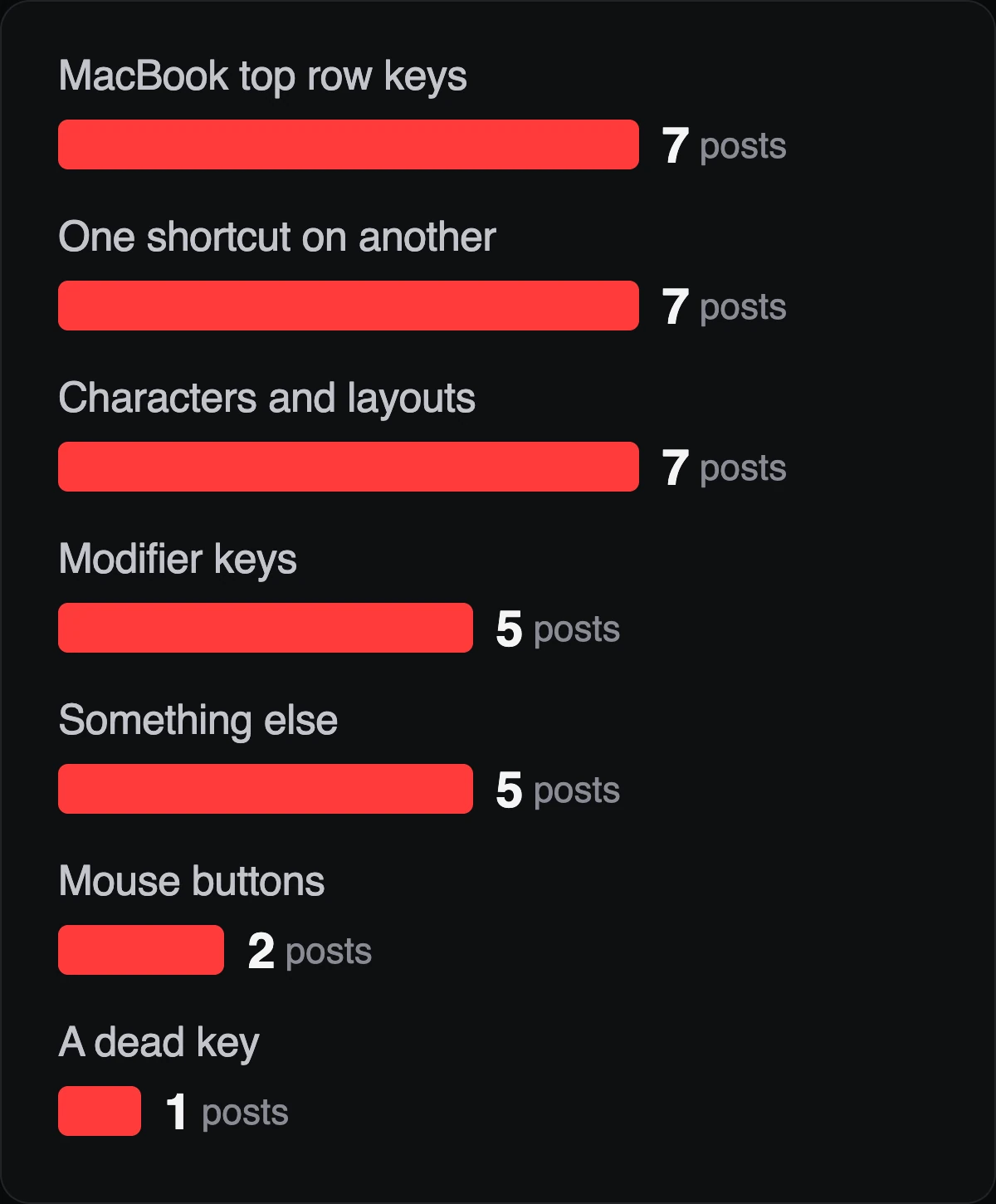
Three groups tie at the top with 7 posts each: the MacBook top row, one shortcut on another, and characters and layouts. Modifier keys, the part the ranking pages cover, comes fourth with 5.
Then each of the 27 keyboard questions went to the first place that answers it. That is our reading of the posts, some fit two places.
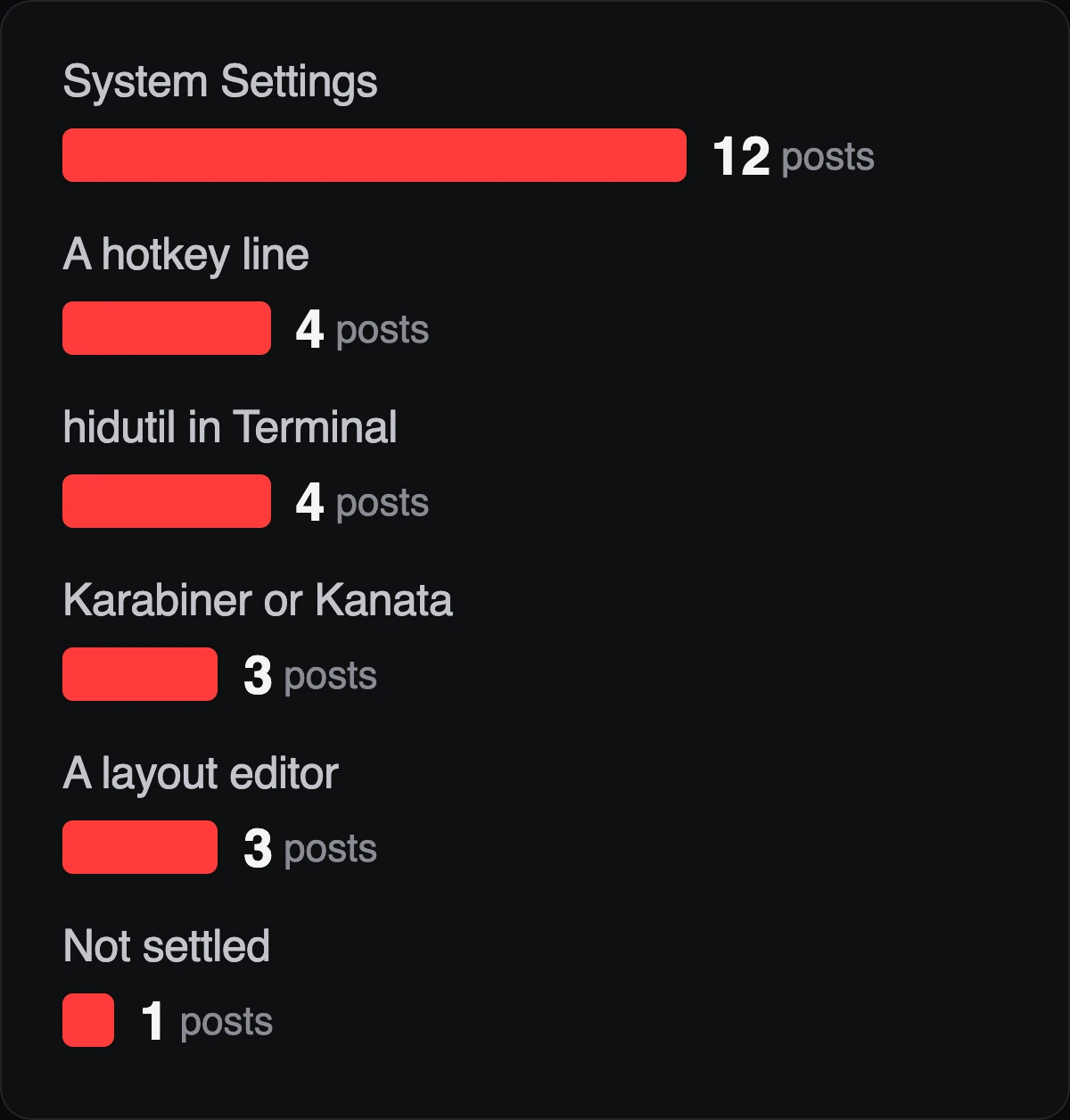
12 of 27 had an answer in System Settings, 3 needed a remapper that works below the apps, like Karabiner-Elements. Karabiner was still the usual answer in the threads. The top post of the count, about the § key with 63 points, got its top answer in two words and 69 points: "karabiner elements".
YouTube answers a different question. Of 38 results for "remap keyboard mac" and "remap macbook keyboard keys", 15 are about a Windows keyboard and 3 about a MacBook's own keys. No title names the Spotlight, Dictation or Do Not Disturb keys, and 7 of the 34 posts asked about the top row.
Modifier Keys: Caps Lock, Control, Option, Command and Globe
- Open the Apple menu and choose System Settings.
- Click Keyboard in the sidebar. You may need to scroll down.
- Click Keyboard Shortcuts, then Modifier Keys in the sidebar.
- Click the pop-up menu of a key, for example Caps Lock.
- Choose what it does now, for example Control, or No Action to switch it off.
Restore Defaults in the same pane brings the original keys back.
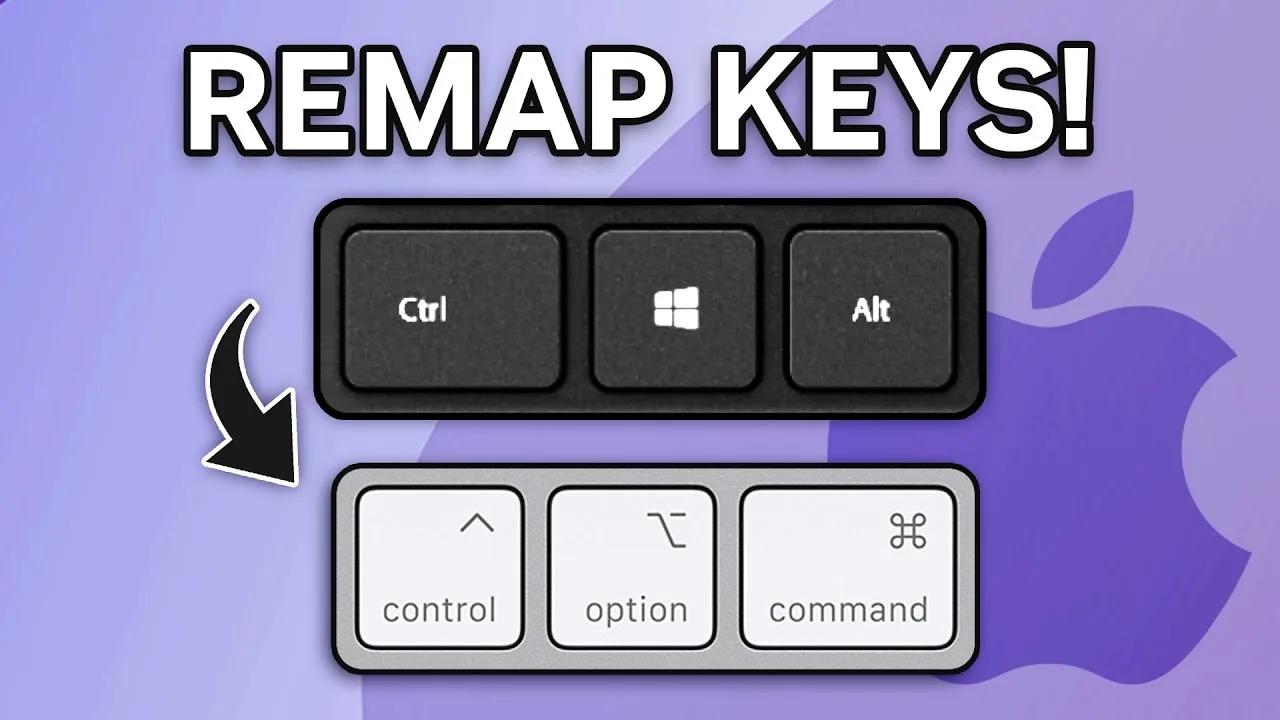
The video shows a Windows keyboard, the pane is the same for a MacBook.
Apple's page does not name the Globe key, but it sits in this pane. TidBITS set Fn to Control in November 2023, "so the Fn key could mimic Control for those who reach for the lower-left corner without looking". Two of the five modifier posts asked for that, and the reply with 6 points said "it's labeled as the "Globe" key in keyboard settings, but yes it's quite re-mappable."
In the same Keyboard settings, Press Globe key to (or Press fn key to) sets what a press of the key alone does: Change Input Source, Show Emoji & Symbols, Start Dictation, which starts on two presses, or Do Nothing.
Where it goes wrong:
- The pane moved. Since macOS 13 Ventura Modifier Keys sits inside Keyboard Shortcuts, and 2 of the 5 ranking pages we read still send you to System Preferences for it. A 9to5Mac viewer: "In Sonoma 14.4+ I had to search for "modifier key" in settings to get the right panel to show up."
- A swap can stop at the external keyboard. A TidBITS reader found the Caps Lock and Globe swap "works on my 2022 MacBook Pro's built-in keyboard, but not on the Bluetooth-connected Apple Magic Keyboard".
- The pane has no left and right, it is "both option keys, or none," as a blog put it in April 2025. One side only is a hidutil job, below.
- Caps Lock with a real job costs you on every miss: "I hit it by accident too often when trying to typing A I do not want to escape out of a form". Caps Lock to Escape is the hidutil line in the Karabiner-Elements alternative guide. The key has its fans, a comment with 3,800 likes under a Caps Lock video: "sql devs called they want their key back".
On a Windows keyboard Alt works as Option and Ctrl or the Windows key as Command, Apple says. The swaps that put Command next to the space bar are in how to remap keys on Mac.
The top row: F4 is Spotlight, F5 Dictation, F6 Do Not Disturb
On a MacBook Air and a MacBook Neo the top row is F1 and F2 display brightness, F3 Mission Control, F4 Spotlight Search, F5 Dictation (press and hold for Siri), F6 Do Not Disturb, F7 to F9 media, F10 mute, F11 and F12 volume. Hold fn (Globe) while pressing one for the plain F key.
A poster in July 2025 wanted a shortcut on "one of the unused keys(F5, F6) on my keyboard without going through Karabiner", since "the process is way out of my skill level". The reply with 11 points was System Settings: "You can assign F keys to these."
First make the top row plain F keys:
- Open System Settings and click Keyboard.
- Click Keyboard Shortcuts, then Function Keys in the sidebar.
- Select Use F1, F2, etc. keys as standard function keys.
Now F5 sends F5. Then put an F key on a system action:
- In Keyboard Shortcuts, select a category in the sidebar, for example Mission Control or Spotlight.
- Select the checkbox next to the shortcut you want to change.
- Double-click its current keys and press the F key, for example F6.
- Quit and reopen the apps you use.
A shortcut another command already has does not work, Apple says, change one of the two. Of the two posts that wanted keyboard brightness on an F key, one brought its own hidutil LaunchAgent, the other found older recipes failed on an M3 MacBook Air.
Home, End and Forward Delete live under fn
| Press | You get |
|---|---|
| fn Left Arrow | Home |
| fn Right Arrow | End |
| fn Up Arrow | Page Up |
| fn Down Arrow | Page Down |
| fn Delete | Forward Delete, or Control D |
They need no setup, Apple lists them with the Mac keyboard shortcuts.
Any key into any other key with hidutil
The hidutil command of macOS remaps any key. Apple documents it in TN2450, a 2017 note for macOS Sierra that still ranks first for this search. A key is 0x700000000 plus its code from Apple's table.
| Key | Value |
|---|---|
| A | 0x700000004 |
| Escape | 0x700000029 |
| Caps Lock | 0x700000039 |
| Left Control | 0x7000000E0 |
| Right Option | 0x7000000E6 |
| Right Command | 0x7000000E7 |
The Globe key is not in Apple's table.
A MacBook has one Control key, on the left. This line makes the right Option key a second Control, the one side remap Modifier Keys cannot do:
hidutil property --set '{"UserKeyMapping":[{"HIDKeyboardModifierMappingSrc":0x7000000E6,"HIDKeyboardModifierMappingDst":0x7000000E0}]}'
Paste it into Terminal and press Return. hidutil property --get "UserKeyMapping" shows what is set, (null) when nothing is. For one Command key only, the right one is 0x7000000E7. The line sets the whole list, so every pair goes into one line, as in Apple's example that swaps A and B.
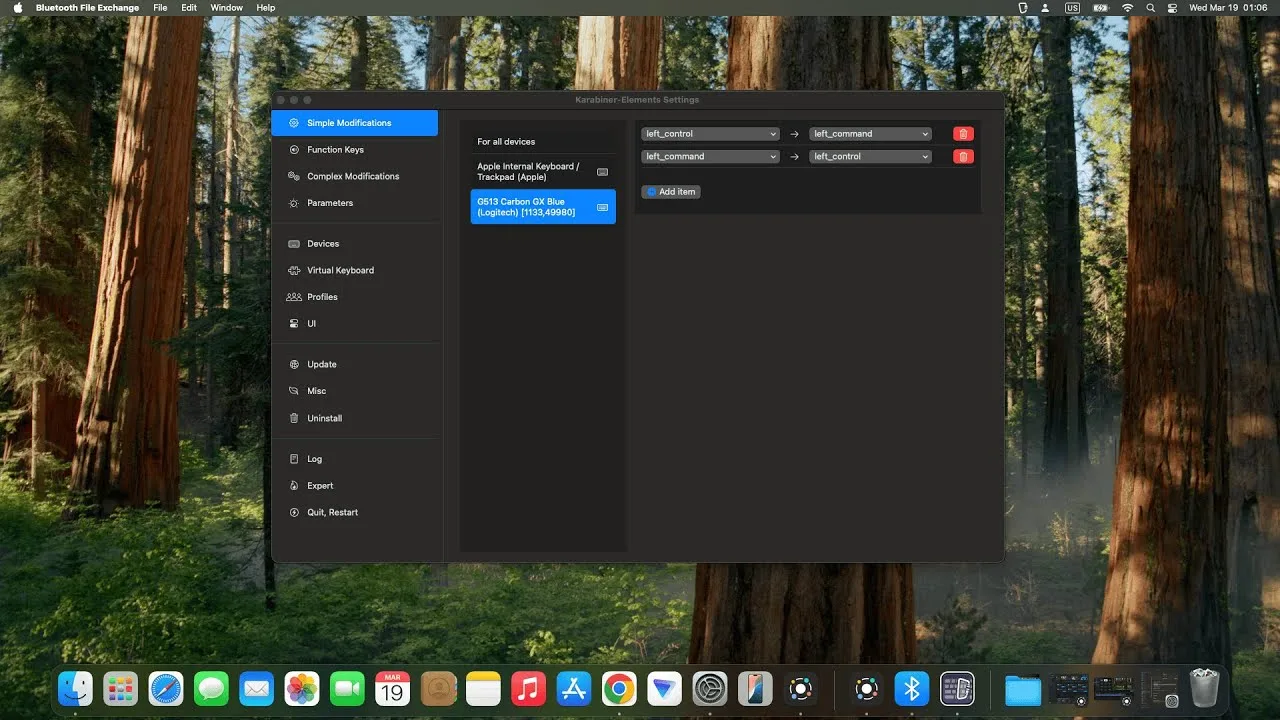
Letters work the same way. A post from February 2026: "Liquid spilled and key A is now unresponsive." With 0x700000004 as the destination, the right Option key types a. Apple's note shows no way to turn a stuck key off. Karabiner did it for a commenter on macOS 26.5: "Disable up arrow is better than replace my entire keyboard." This video fixes a broken MacBook key with Karabiner, its permission steps are older than Karabiner 16.
Keep it after a restart
Apple's note: "Key remappings are lost when the system is restarted or if the keyboard service is removed (for example when the last keyboard is disconnected.)" The fix people post is a LaunchAgent that runs the line at every login. This one is from an r/MacOS answer of July 2025, with the right Option mapping in it:
<?xml version="1.0" encoding="UTF-8"?>
<!DOCTYPE plist PUBLIC "-//Apple//DTD PLIST 1.0//EN" "http://www.apple.com/DTDs/PropertyList-1.0.dtd">
<plist version="1.0">
<dict>
    <key>Label</key>
    <string>com.local.KeyRemapping</string>
    <key>ProgramArguments</key>
    <array>
        <string>/usr/bin/hidutil</string>
        <string>property</string>
        <string>--set</string>
        <string>{"UserKeyMapping":[{"HIDKeyboardModifierMappingSrc":0x7000000E6,"HIDKeyboardModifierMappingDst":0x7000000E0}]}</string>
    </array>
    <key>RunAtLoad</key>
    <true/>
</dict>
</plist>
Save it as plain text to ~/Library/LaunchAgents/com.local.KeyRemapping.plist, it runs at the next login. To undo, delete the file and restart.
The permission the ranking pages skip
Apple's note says "No special privileges are required". From macOS 14.2 people reported the line stopped working without a word until it ran with sudo, in Apple's forum and on Open Radar. We found no report either way for macOS 26 or 27, and none of the five ranking pages mentions it. When a key does nothing after the line, those reports put sudo in front of it.
§ and accents are a layout job
The top post of the count, June 2025, 63 points: "The Portuguese layout of the MacBook keyboard has this useless § key that no one uses, and I would like to remap it to act as a useful modifier or hyperkey". One reply: "I bound tilde (~) to the key like a civilised person, thank you very much." Another: "Karabiner, but what sort of weirdo doesn't want to type the barred spiral galaxy symbol?"
A Hyper key on § needs Karabiner. Another character on §, or accents a US MacBook does not print, need no remapper:
- Press and hold a letter. A reply to a Brazilian with a US MacBook: "Press and hold the a key until a small menu of accented characters appears."
- Add the layout you need as an input source under Keyboard, Text Input, Edit in System Settings, and set Press Globe key to to Change Input Source to switch with one press.
- Make your own layout with Ukelele, a free layout editor. It writes a layout file that installs as an input source, so § can type ~ in every app.
A hotkey can flip two layouts on Option Shift alone, as Alt Shift does on Windows. Option Shift K still types what it did.
// Option and Shift pressed together switch between US and Spanish
!* switchKeyboardLayout("com.apple.keylayout.US", "com.apple.keylayout.Spanish")
// Control Option Command L lists the ids of your input sources
^!#l displayAvailableKeyboardInputSources()
Put the id the second line shows for your layout in place of Spanish.
One key with a different job in each app
App Shortcuts, the built in way, gives a menu command new keys, in one app or in all of them:
- Open System Settings, click Keyboard, then Keyboard Shortcuts.
- Select App Shortcuts and click the plus.
- Choose the app, or All Applications.
- Type the menu command exactly as the menu shows it.
- Click the shortcut field, press the keys and click Done.
A poster in September 2026 set Command E for Close Window under All Applications: "However, it simply doesn't work." The replies found why. "App Shortcuts only works if the menu item is literally named Close Window in that specific app, and Cmd E is already taken in most apps for Use Selection for Find, which is why it silently fails." And: "in Finder, Command + E is "Eject"." The poster wanted it in every app except Chrome.
In a hotkey file the key does its new job only in the apps you name:
// Command E closes the window in Safari and TextEdit, Chrome and Finder keep their own
#e if currentApp("com.apple.Safari", "com.apple.TextEdit") sendKeys("command-w")
// Command Q never quits an app by accident
#q consume
// F5 reloads the page in Chrome, with fn held or with standard function keys on
f5 if currentAppChrome() sendKeys("command-r")
// the § key of an ISO keyboard jumps to the address bar in Chrome, opens Chrome elsewhere
section
    if currentAppChrome() sendKeys("command-l")
    else runApp("Google Chrome")
// Control Option W shows the bundle id of the app in front
^!w displayActiveWindowInfo()
A line is the key, a space and what it does. # is Command, ^ Control, ! Option, * Shift. A key with an if reaches every app the line does not name untouched. The last line shows the bundle id of an app to add, Hotkeys asks for Screen Recording for it.
- Download Hotkeys from hotkeys.io, or run
brew install --cask hotkeys-app/tap/hotkeys. It needs macOS 14 Sonoma or later. - Open it and switch it on under System Settings, Privacy & Security, Accessibility.
- Click its icon in the menu bar and choose Edit config.
- Paste the lines and save.
- Choose Reload in the same menu. Saving alone changes nothing.
Mouse side buttons are hotkeys too, mouse4 and mouse5.

Every shortcut in one text file, a key per line. The first 50 hotkeys are free.
Karabiner-Elements, when a key has to become another key
Some jobs need a remapper below every app: a Hyper key, Escape on a tap of Caps Lock and Control on a hold, layers, Globe plus a letter, a stuck key switched off. TidBITS on the Globe key: "Unlike Shift, Control, Option, and Command, the Fn key can't be used as a standard modifier key."
Karabiner-Elements is free and open source. Version 17.0.0 is dated 27 November 2026 and needs macOS 13 Ventura. It asks for a driver extension under Login Items & Extensions, Accessibility for Karabiner-Core-Service since 16.0.0, and since 17.0.0 "Karabiner-Elements Privileged Daemons v3" under Background App Activity. Input Monitoring, the step before 16.0.0, now normally comes with Accessibility. Simple swaps are clicked together, rules per app and per keyboard are JSON.
Users split on it. "Takes about 5 minutes once you understand the JSON," says the Command E thread, the F5 poster found it "way out of my skill level". Under a Karabiner video, 24 likes: "Using software such as Karabiner that is not in the app store is security risk." A reply: "Especially when the software is basically just a keylogger". Its source is open for anyone to read.
macOS 26.4 beta cut remappers off the MacBook's own keyboard
In February 2026 a developer wrote on Apple's forums: "Since macOS 26.4 Beta 1, virtual HID devices created via DriverKit can no longer intercept key events from the built-in MacBook keyboard." And: "External keyboards are unaffected." Karabiner's GitHub issue closed on 3 March 2026 after users found beta 3 fixed it. Later posts still report trouble on 26.4, a Driver Extension switch that turned itself off, Full Disk Access for Karabiner Core Service. When a remap works on an external keyboard and not on the MacBook's own after an update, check this first. None of the ranking pages mention it.
Other apps people use for this
Read on their own pages on 27 November 2026.
- Karabiner-Elements, free and open source. The default answer on Reddit. The cost is JSON past a simple swap and three approvals.
- BetterTouchTool, a 45 day free trial, then a Standard license with two years of updates or a Lifetime license. Tap and hold keys, rules per app and "only on the built-in or only on external keyboards". The second answer in the threads.
- Keyboard Maestro 11.1.1, a one time purchase for version 11 after a free trial. A macro app, its page does not sell key remapping.
- Ukelele 3.7.1, freeware, macOS 12 or later. A layout editor for § and accents.
- Kanata, free, a text config with layers and tap and hold. On macOS it needs the Karabiner driver and runs with sudo in a window that stays open.
- KeyPath 1.0.1, free, a Mac app on top of Kanata for macOS 15 or later, still a pre-release.
- Logi Options+, VIA or QMK, named in the threads for keyboards that support them.
What Hotkeys does not do
It does not change what a key is. Caps Lock to Escape, Globe to Control, one side of a modifier, tap versus hold, layers and a Hyper key are Modifier Keys, hidutil or Karabiner.
Caps Lock, Globe, Touch ID and the printed functions of the top row are not hotkey names. An F key hotkey on a MacBook fires only with fn held or with standard function keys on. So a bare f5 means a top row of plain F keys, or pressing fn every time.
It does not change what a key types. Accents, § as a character and a broken letter key are a layout or hidutil job.
A sent shortcut works only where the app in front knows it. sendKeys("command-w") in an app without a Close Window command does nothing.
In a password field a key that types a character, pressed without Command or Control, never fires. § in a password field types §. Combinations with Command or Control keep firing there.
It works while it runs, Disable in its menu pauses every hotkey. There is no window to click rules into, you edit the file and reload. Its docs show no rules per keyboard, so a line fires on the MacBook keyboard and on an external one alike, where BetterTouchTool and Karabiner can tell them apart.
It needs macOS 14 Sonoma or later. Hotkeys Lite from the App Store cannot send keys, use mouse buttons or modifier-only hotkeys, so most lines here need the full app. Lite still reads the older hotkeys.yml format, its update to this one is waiting for App Store review, with no date. Without a license the first 50 hotkeys load, every method included, with no time limit.
Apple's pages on this: change the behavior of the modifier keys, use the function keys on Mac.
Save this guide
Questions
How do I remap my MacBook keyboard?
Modifier Keys in System Settings changes Caps Lock, Control, Option, Command and Globe. Function Keys and Keyboard Shortcuts give the top row F1 to F12 and system actions. hidutil in Terminal turns any key into another until the next restart.
Can I remap the Globe or fn key on a Mac?
Yes, in Modifier Keys, where it shows as Globe, for example as Control. Press Globe key to sets what a press of it alone does. It cannot become a standard modifier for shortcuts.
Can I remap a broken key on a MacBook?
A key that stopped typing, yes. A hidutil line makes another key type its letter, and a LaunchAgent sets it again at each login. A key stuck down has to be switched off, Karabiner-Elements does that.
Do remapped keys survive a restart?
Modifier Keys and Keyboard Shortcuts are settings and stay. A hidutil line is gone after a restart, Apple says so, unless a LaunchAgent sets it at login. Karabiner and Hotkeys work while they run.
Every shortcut in one text file, a key per line. The first 50 hotkeys are free.
More guides
- Is there a Karabiner-Elements alternative for Mac?Most Karabiner-Elements jobs need no driver. macOS remaps Caps Lock and the modifiers, a hotkey file gives a key its own job in each app.
- How to remap keys on MacmacOS remaps Caps Lock, Control, Option and Command in System Settings. Home, End, F5 or a mouse button get a new job with one line of text.
- How to force quit on Mac with a keyboard shortcutOption Command Esc opens Force Quit on any Mac. The other built in ways, and one key that force quits a hung app with no window to click.
- Which Apple computer shortcuts to learn first on a MacThe Mac keyboard shortcuts used every day, the extra keys of a MacBook, how to change one in System Settings and add keys Apple does not have.
- How to open an app with a keyboard shortcut on MacmacOS has no setting for it. The Shortcuts app does it in a minute per app, a hotkey file in one line per app.